Download Drift Max Pro MOD For Free
**Drift Max Pro**, developed by **Tiramisu**, is a skill-based driving simulator centered on **Tuner Culture**. This Racing application challenges players to master distinct physics mechanics across a robust offline **Career Mode** and competitive **Online Multiplayer** battles. **APK Games Tech** highlights that users must strategically accumulate **Gold**, **Cash**, and **Upgrade Cards** to customize vehicles while managing **Tires** for continued progression. Experience realistic drifting mechanics by downloading the game safely and quickly from GB Plus Apps today.
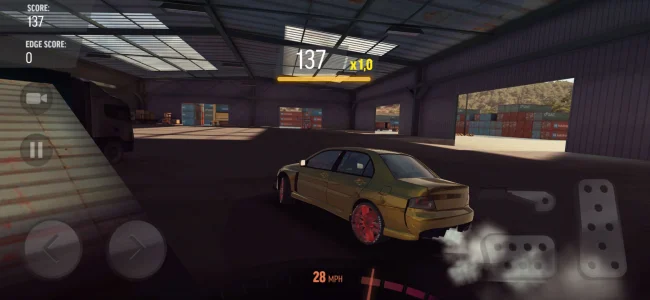
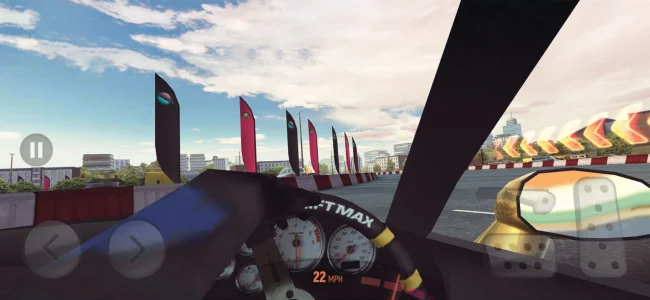
Game Screenshots
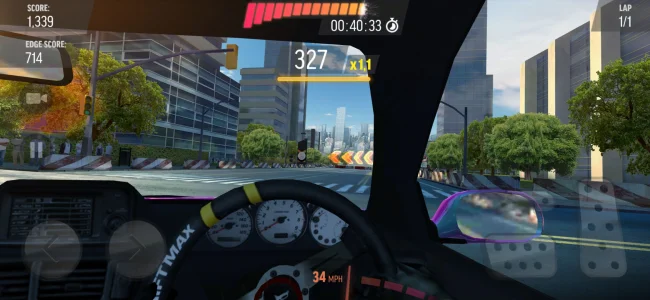
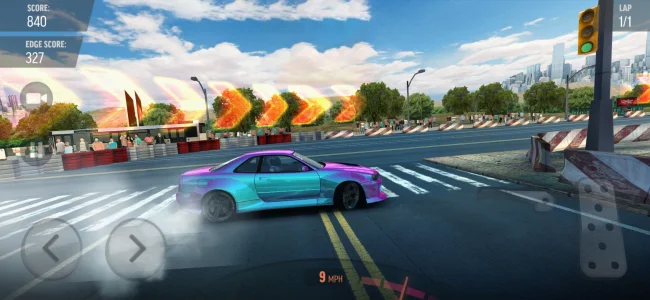
Game Details
Introduction to Drift Max Pro
Drift Max Pro is a premier mobile driving simulator developed and published by Tiramisu (legally known as TIRAMISU STUDIOS YAZILIM HIZMETLERI ANONIM SIRKETI). Since its global release on December 15, 2017, the title has established itself as a dominant force in the Racing genre, specifically targeting the sub-genres of Drift and Realistic Car Driving Simulator. Unlike traditional arcade racers that prioritize speed, this application focuses on the physics-based mechanics of vehicle control, requiring players to master throttle management, counter-steering, and braking techniques to execute high-scoring drift maneuvers.
The game is available across multiple ecosystems, including Android, iOS, and PC via Google Play Games. While the iOS version operates on a separate development branch (currently v2.7.x), the Android ecosystem utilizes the v2.5.x series. Users seeking to download the Drift Max Pro APK must ensure they source the correct build for their device architecture, as the latest updates enforce stricter OS requirements, necessitating Android 8.0 or later for stability.
Gameplay Modes and Progression Architecture
Drift Max Pro employs a segmented game loop designed to cater to both offline play and online competitive engagement. The structure guides players through resource-acquisition loops to fund vehicle upgrades.
Single-Player Offline Modes
A defining feature of the title is its robust offline functionality. The developer explicitly markets the game with the slogan, "Long live offline games," ensuring that core progression remains accessible without an internet connection.
- Career Mode: This serves as the primary campaign, spanning 10 seasons and hundreds of challenges. Players complete objectives to earn Cash, Gold, and Upgrade Cards.
- Pro Career Mode: Designed as a "nightmare career path" for expert players, this mode offers significantly higher rewards (stated as 4x Cash and Gold) and unlocks an exclusive car. It acts as the most efficient resource farming method for skilled Free-to-Play (F2P) users.
- Quick Play ("Burn the Asphalt"): This category includes arcade-style modes such as Slalom Drifting, Cone Toppling, and Perfect Drift Racing. It also features a Free Ride mode, a sandbox environment used for practicing mechanics and recording drift videos without scoring pressure.
Online Multiplayer and Events
While the core game is offline-capable, specific high-engagement features require connectivity. The Online Multiplayer Mode (1v1 Dual) allows players to compete in drifting battles or traditional racing to climb leaderboards. Additionally, The Contender Events provides time-limited challenges tied to seasonal themes, offering high-value currency rewards to incentivize daily logins.
Technical Mechanics: Physics and Tuning
The application distinguishes itself through a deep physics engine that simulates real-world "Tuner Culture." Success in Drift Max Pro is not determined by vehicle speed alone but by the tuning configuration and driver input.
Customization is divided into visual modifications and performance tuning. Performance upgrades cover the Turbocharger, Tire Type, Gearbox, and Sensors. However, the "Stance" and suspension tuning are critical for gameplay. Players can modify the Wheel Camber Angle and suspension height to alter the car's contact patch and handling characteristics.
The control scheme supports the simulation aspect by providing separate inputs for the Gas, Front Brake, and Rear Brake (Handbrake). This separation allows for advanced techniques such as "trail braking," where the front brake is used to shift weight and adjust the drift angle, while the rear brake is used solely to break traction.
APK Installation and Technical Requirements
Installing Drift Max Pro via an external APK repository requires specific technical steps due to the game's data structure. The application relies on an OBB (Opaque Binary Blob) file to house assets, which is not included in the base APK file size of approximately 60 MB.
Step-by-Step Installation Guide
- Download Files: Acquire both the v2.5.x APK file and the corresponding OBB data file (often found as a .zip or .obb).
- Install APK: Run the APK installer but do not launch the game immediately.
- Place OBB Data: Extract the OBB file. Move the folder named
com.tiramisu.driftmax2to the directory:Internal Storage / Android / obb /. - Launch: Once the data file is correctly placed, launch the application to initialize the game.
Users must be aware of "OS Requirement Creep." While older builds supported Android 4.1, the latest 2025 builds require Android 8.0 or higher. Installing an incompatible version will result in a "Parse Error."
Critical Save System Warning
A pivotal technical detail for all users is the game's save architecture. Drift Max Pro does not feature automatic cloud saving. By default, all progress is stored locally on the device.
The developer explicitly warns that uninstalling the game or clearing the cache will result in the permanent loss of all progress and in-app purchases. To prevent data loss, players must connect their Google Play Games account and manually trigger the "Save to Cloud" or "Sync Progress" function within the settings menu regularly.
Monetization and User Experience
The game utilizes a Free-to-Play model supported by a hybrid monetization strategy involving ads and In-App Purchases (IAPs).
- Ad System: The game features interstitial ads after races and rewarded ads for bonuses. A known technical issue, the "Black Screen Bug," often occurs after ads, forcing a game restart.
- Energy System: Progression is gated by "Tires" (energy) for career modes and "Tickets" for multiplayer. These resources regenerate over time.
- IAPs: Players can purchase "Remove Ads," "Infinite Tires," and various currency packs. The "Remove Ads" purchase is highly recommended by the community as it effectively patches the black screen crash issue.
Despite these friction points, the game avoids a "Pay-to-Win" structure. All vehicles and upgrades can be earned through gameplay grinding, specifically via the high-yield Pro Career Mode.
Troubleshooting Common Issues
Black Screen After Ad: If the game freezes on a black screen, the ad's close button may be invisible. Tapping the top-right corner can sometimes trigger the close function. Alternatively, waiting 30-45 seconds may resolve the freeze.
Performance Lag: Extended play sessions (45-60 minutes) may lead to memory leaks, causing stuttering. Restarting the application clears the RAM and restores performance.
Conclusion
Drift Max Pro stands as a definitive title for mobile drifting enthusiasts. By combining high-fidelity graphics with a nuanced physics engine and offline playability, it offers a depth of content rarely seen in the mobile market. While the lack of auto-cloud saves and the presence of ad-related bugs require user vigilance, the core driving experience remains best-in-class for players willing to master its mechanics.
Game Overview and Technical Architecture
Drift Max Pro is a physics-based driving simulator developed and published by Tiramisu Studios. Categorized primarily under the racing genre with specific sub-classification as a drift and stunt driving simulator, the application focuses on technical vehicle control rather than traditional linear racing speed. First released globally in December 2017, the title has evolved into a live-service platform supporting Android, iOS, and PC environments via emulation or native macOS support for Apple Silicon. The software architecture distinguishes between platform versions, with iOS builds currently operating on version 2.7.x and Android builds maintaining a separate feature set on version 2.5.x.
The core technical framework prioritizes offline functionality, adhering to the developer’s philosophy of “Long live offline games.” The single-player content, including the extensive Career Mode and Free Ride, operates entirely without an internet connection. However, specific meta-game features such as Online Multiplayer, seasonal Contender Events, and Daily Objectives require active network connectivity to validate results and synchronize leaderboard data. A critical technical component for Android users is the requirement for an OBB (Opaque Binary Blob) data file in addition to the base APK, resulting in a total installation footprint of approximately 500 MB.
Core Gameplay Mechanics and Physics
The gameplay loop centers on the accumulation of “Drift Points” through the execution of high-angle, sustained vehicle slides. The physics engine simulates complex automotive dynamics, requiring players to manage weight transfer, tire grip, and throttle application. Unlike arcade racers that simplify steering, Drift Max Pro utilizes a control scheme that separates the Front Brake from the Rear Brake (Handbrake). This distinction allows for advanced driving techniques; the handbrake initiates the loss of traction, while the front brake facilitates “trail braking” to adjust the car’s angle mid-drift without losing momentum.
Control input options cater to varying levels of player precision. The touch interface places the throttle, brake, and handbrake on-screen, while tilt controls utilize the device’s accelerometer for steering. For high-level competitive play, the application supports external Bluetooth Game Controllers, providing analog input for smoother steering and throttle modulation. The physics simulation rewards fluid inputs and penalizes “jerky” steering or excessive handbrake usage, which can stall the vehicle’s momentum and terminate the drift combo.
Game Modes and Progression Structure
The application divides content into offline progression paths and online competitive environments. The primary single-player campaign, Career Mode, spans 10 distinct seasons featuring hundreds of individual challenges. Progression through these seasons unlocks new tracks and provides the primary source of Cash and Gold. To mitigate the repetitive nature of resource farming, the developer introduced Pro Career Mode. This high-difficulty “nightmare” path creates an endgame loop for skilled players, offering 4x higher currency rewards and exclusive vehicles upon completion.
For shorter gameplay sessions, the “Burn the Asphalt” category offers arcade-style objectives. Slalom Drifting tests precision by requiring players to navigate between cones, while Cone Toppling incentivizes destruction and impact accuracy. Perfect Drift Racing demands flawless execution of drift lines without wall contact. The Free Ride mode serves as a sandbox environment, removing timers and objectives to allow for tuning tests and mechanic practice. Conversely, the Online Multiplayer Mode (1v1 Dual) facilitates direct Player-versus-Player (PvP) interaction, splitting competition into drift-score battles and traditional finish-line racing.
Vehicle Customization and Tuning Culture
Drift Max Pro integrates a deep “Tuner Culture” aesthetic, treating vehicle modification as a core gameplay pillar rather than a secondary feature. The garage system allows for the acquisition and modification of over 30 distinct vehicles, ranging from entry-level sports cars to high-performance “Supercars.” Customization is segmented into cosmetic enhancements, performance upgrades, and suspension tuning.
Visual and Performance Modifications
Visual customization options are extensive, allowing players to alter the vehicle’s geometry and livery. Users can modify paint finishes (matte, two-tone), apply graphical decals, and install neon underglow systems. Physical modifications include changing rim models, adjusting window tint, and selecting caliper colors. Performance upgrades directly impact the physics simulation. Players spend Cash and Upgrade Cards to enhance the Turbocharger, Tire Type, Gearbox, and Sensors. These upgrades increase the vehicle’s horsepower and grip thresholds, which is essential for maintaining drifts on longer, faster tracks in later seasons.
Advanced Tuning Specifications
The Tuning Menu provides direct control over the car’s stance and handling characteristics, a feature that separates casual players from competitive drifters. Players can adjust the Wheel Camber Angle and Suspension Height. Unlike cosmetic changes, these adjustments alter the tire contact patch and center of gravity. High-level play requires understanding how these variables interact with the physics engine to maximize drift stability and angle.
Economic Architecture and Resource Management
The game functions on a dual-currency economy supported by an energy system. Cash serves as the soft currency, earned through standard gameplay and used for basic upgrades. Gold acts as the premium currency, required for purchasing exclusive high-tier vehicles and special items. The economy employs a “scarcity” mechanic through the Tire system. Entering a Career or Quick Play event consumes one Tire, which regenerates slowly over time. This energy mechanic limits session length for free-to-play users, though it can be bypassed via the “Infinite Tires” In-App Purchase (IAP).
Monetization strategies include interstitial video ads, rewarded ads, and direct bundle purchases. A noted “Triple Jeopardy” loop exists within the free-to-play experience involving the ad system and save mechanics. A technical bug occasionally causes a “Black Screen” freeze after an ad plays. Because the game lacks automatic cloud saving, a forced restart due to this bug results in the loss of progress from the preceding race. Consequently, the “Remove Ads” purchase functions technically as both a convenience feature and a stability fix.
Strategic Gameplay Optimization
Success in Drift Max Pro relies on optimizing vehicle tuning and efficient resource management. Mastery of the physics engine requires specific adjustments to the car’s differential and suspension geometry. The following strategies outline the optimal approach for progression and competitive scoring:
- Differential Locking: Set the Differential Locking Ratio to 1.00 (100%) in the tuning menu. This “welds” the differential, forcing both rear wheels to spin at the same speed, which significantly increases stability during drift initiation.
- Camber Adjustment: Apply negative camber to the front wheels (e.g., -4.5° or higher). This ensures that the lead tire maintains a flat contact patch with the asphalt while the car is sideways, providing necessary grip for steering control.
- Brake Bias Tuning: Shift the brake balance toward the front (approx. 70%). This configuration allows the front tires to grip and pull the car’s nose inward when trail braking, preventing spin-outs.
- Manual Transmission: Utilize manual gear selection to keep the engine in its peak power band (high RPMs). Automatic transmission often upshifts too early, causing a loss of torque required to sustain a drift.
- Resource allocation: Hoard Gold exclusively for purchasing premium cars. Avoid spending Gold on standard upgrades or timers, as these can be managed with Cash or patience.
- Energy Management: Prioritize high-reward activities like Pro Career Mode or Contender Events when the Tire energy meter is full to maximize the return on investment for each login session.
Data Persistence and Hardware Requirements
A critical operational detail for all users is the absence of an automatic cloud save system. The developer explicitly warns that Drift Max Pro saves data locally to the device by default. Deleting the application or clearing the cache results in permanent data loss. To preserve progress, users must connect a Google Play Games account and manually trigger the “Save to Cloud” function within the settings menu regularly.
Hardware requirements have evolved with recent updates, known as “Requirement Creep.” While older versions supported Android 4.1, the latest builds (v2.5.x) necessitate Android 8.0 (Oreo) or higher. Users with older devices must source specific legacy APK and OBB files compatible with 32-bit ARM7 architectures. The installation requires roughly 2 GB of free space to accommodate the extracted OBB data and cache accumulation during extended play sessions.
Common Questions
Is Drift Max Pro playable without an internet connection?
Yes, core single-player modes like Career and Free Ride are fully functional offline, though Multiplayer and Events require an internet connection.
Does the game automatically save progress to the cloud?
No, the game does not have an auto cloud save feature, so you must manually save via the settings menu to avoid losing data.
What happens if I uninstall the game?
Because there is no automatic cloud save, uninstalling the game will delete all your progress and in-app purchases unless you manually backed them up.
Is there a multiplayer mode available?
Yes, the game features an Online Multiplayer Mode (1v1 Dual) where players compete in drifting or racing battles.
How do I update the APK without losing my progress?
You must install the new APK file directly over the existing installation; never uninstall the old version first or your local save data will be lost.
What are the minimum Android requirements for the latest version?
The latest builds (v2.5.x) generally require Android 8.0 or later, while older builds may support Android 5.0+.
Do I need an OBB file to install the game manually?
Yes, installing requires both the base APK and a large OBB data file placed in the specific internal storage directory.
Is Drift Max Pro considered pay-to-win?
No, it is "pay-for-convenience" as all cars and upgrades can be earned through gameplay, while paying removes ads and energy restrictions.
What is the purpose of the Tire system?
Tires act as an energy system that limits play sessions, as entering single-player events consumes one tire until they regenerate over time.
How can I fix the black screen freeze after an ad?
This bug occurs when the close button is invisible; try tapping the top-right corner of the screen or waiting 30 to 45 seconds.
Does the game support external game controllers?
Yes, Drift Max Pro is compatible with external game controllers, such as Xbox and PlayStation gamepads.
What is the best way to earn in-game currency quickly?
High-skill players should grind Pro Career Mode for 4x rewards or complete time-limited Contender Events for high-value payouts.
What is the Pro Career Mode?
It is a high-difficulty "nightmare" career path designed for expert players that offers significantly higher cash and gold rewards.
How should I tune my car for better drifting?
For pro-level stability, it is recommended to set the Differential locking ratio to 100% and use a high negative value for Front Camber.
Can I play Drift Max Pro on a PC or Mac?
Yes, it is available on Windows via Google Play Games and on macOS for devices with an Apple M1 chip or later.