

Master the art of "wobbly" parkour in the hilarious Human Fall Flat apk, a physics-based puzzle platformer that turns every movement into a comedic challenge. Published by 505 Games, this open-ended sandbox tasks you with guiding the clumsy "Bob" through surreal dreamscapes like Copper World and Museum using a unique active ragdoll system. Visit APK Games Tech today for a high-speed, secure Human Fall Flat download. Team up with up to 4 players to solve environmental puzzles or fling friends off ledges in this definitive mobile experience.
Preview Images
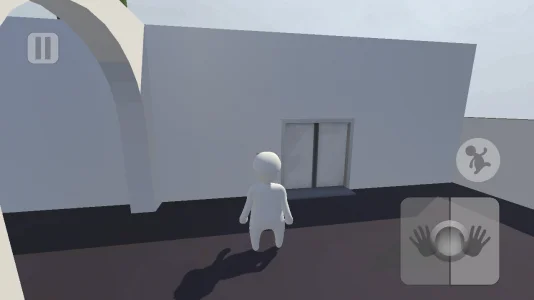
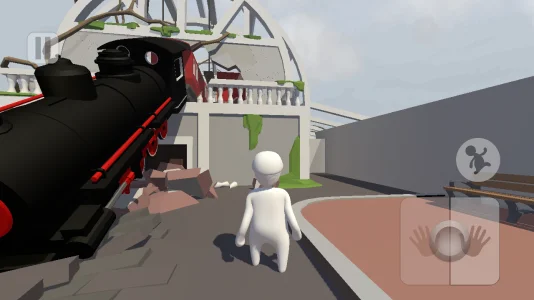
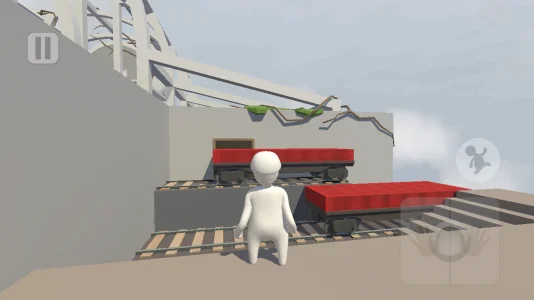
Description
The Physics of Failure: Identity and Mobile Architecture
Human: Fall Flat represents a distinct evolution in the physics-based puzzle genre, successfully transitioning from PC roots to a highly optimized mobile experience. Originally conceived by No Brakes Games, this title operates on a unique premise: the decoupling of player intent from avatar execution. Unlike traditional platformers where input creates precise movement, the Human: Fall Flat apk places players in control of a "Bob"—an active ragdoll with physically simulated limbs. The challenge does not stem from enemies or timers, but from the comedic struggle to perform basic tasks like climbing ledges or moving boxes against the forces of momentum and friction.
The mobile iteration was technically engineered by Codeglue, a studio specializing in ARM-based architecture. They faced the complex challenge of translating the game's heavy Unity physics engine for touch interfaces. While the core "wobbly" identity remains, the mobile build utilizes specific optimizations such as baked lighting and simplified colliders to maintain performance on Android and iOS devices. Published globally by 505 Games, this version is distinct from the curve-published console editions, offering a tailored interface that includes virtual joysticks and touch-specific grabbing mechanisms.
Gameplay Mechanics and the "Active Ragdoll" Loop
The core gameplay loop is defined by "Slapstick Failure." Players navigate 3D environments known as "Dreams," starting with a fall from the sky and ending by exiting through a portal to the next level. The absence of scripted animations means that every solution is emergent; a puzzle intended to be solved with a lever can often be bypassed by stacking objects or utilizing advanced momentum physics.
The mobile port streamlines the experience into specific modes:
- Single Player Campaign: A fully offline mode where players tackle environmental puzzles solo. This preserves the game's meditative yet chaotic atmosphere without the need for an internet connection.
- Online Multiplayer: Supports up to 4 players in a Peer-to-Peer (P2P) architecture. This mode emphasizes cooperation, requiring players to synchronize their "wobbly" movements to operate heavy machinery.
A common misconception among new mobile players involves the pricing model. The game is a premium title, meaning it is not Human: Fall Flat free to play (F2P) in the global market. Unlike the ad-supported or microtransaction-heavy version published by XD Network in China, the version managed by 505 Games is a one-time purchase. However, the developer maintains a "play forever" philosophy, ensuring that all post-launch content updates and new levels arrive at no additional cost to the user.
Touch Controls and Controller Support
Codeglue implemented a virtual overlay to replace the mouse-and-keyboard inputs. This includes omnidirectional joysticks and dedicated buttons for raising arms independently. While the game supports physical HID controllers (such as Xbox or PS4 gamepads), the mobile port is known for the "Spinning Camera" bug on certain Android versions, a result of legacy input mapping conflicts. Players utilizing touch controls benefit from a mobile-exclusive "Time-out Grabbing" feature, which locks the character's grip to reduce finger fatigue during long climbs.
Visuals, Audio, and World Entities
The visual language of Human: Fall Flat is intentionally low-poly and minimalist. This art style serves a dual purpose: it enhances the comedic nature of the character's movement and significantly reduces the rendering load on mobile GPUs. The "Blank Slate" aesthetic allows the physics simulation to take center stage without visual clutter.
The game's content has expanded significantly via the "Workshop-to-Mobile" pipeline, where 505 Games officially ports winning community levels. The current roster includes diverse environments that introduce unique mechanics:
Original levels like Mansion and Train teach basic locomotion. However, later updates have introduced complex "World Entities." In Copper World, players interact with giant gears and Tesla coils. The Thermal level introduces rising heat mechanics and grappling hooks. The recently added Miniature shrinks the player down to navigate a giant backyard, while the Museum level tasks players with physics-based heists. Each map is contained within the game's OBB (Opaque Binary Blob) data file, requiring significant internal storage space to render these complex physics playgrounds.
Progression and Meta Strategy
Because Human: Fall Flat lacks traditional RPG elements like leveling up or inventory management, progression is entirely skill-based. The "Meta" revolves on mastering the physics engine to break the intended pathing of the levels.
Movement Tech and Speedrunning
Advanced players utilize specific techniques to bypass puzzles:
- The Extended Climb: The most critical skill in the game. By rhythmically releasing one hand, looking up, and re-grabbing, players can scale infinitely high vertical walls.
- Dolphin Diving: A technique involving a jump followed by a horizontal dive, extending the character's hitbox to cross gaps wider than the standard jump allows.
- Mantling: Pulling the character up and over low walls to skip entire puzzle sections, particularly prevalent in levels like Castle.
On mobile, executing these moves requires multi-finger precision, leading many high-level players to prefer controller setups despite the potential for technical bugs.
Economy, Modding, and Monetization
The economy of the global version is strictly non-predatory. There are no "Whale" skins or loot boxes; all cosmetic customization is unlocked through gameplay achievement or included by default. This contrasts sharply with the regional Asian variants of the game.
The Modding Ecosystem
Despite the fair monetization, a significant portion of the community actively seeks out the Human: Fall Flat mod version. These modified APKs utilize "Mod Menus"—floating overlays that inject code into the Unity engine via IL2CPP hooks. Common features sought by modders include:
- Speed Hacks: Increasing movement velocity to traverse large maps instantly.
- Super Jump: Altering vertical impulse to bypass climbing sections.
- License Bypass: Attempting to circumvent the Google Play License Verification (LVL) to run the game without a valid purchase.
It is crucial to note that using a Human: Fall Flat mod in multiplayer can cause severe "Desync." Since the game uses a Peer-to-Peer architecture, a player moving at 10x speed will appear to teleport or jitter on other players' screens, often ruining the cooperative experience. Furthermore, modded versions frequently fail to connect to Google Play Games, disabling cloud saves and achievements.
For a stable and secure experience, players are strongly advised to access the official Human: Fall Flat download through legitimate storefronts. This ensures compatibility with the latest multiplayer protocols and guarantees access to the massive OBB data files required to load the newest levels like Port and Underwater without "Black Screen" errors.
Core Mechanics & Controls
The fundamental experience of Human Fall Flat is defined by its "Active Ragdoll" physics system. Unlike traditional platformers where inputs are binary and precise, this game decouples your intent from the avatar's execution. You control a wobbly, featureless character named Bob, whose limbs behave according to momentum, friction, and mass. To succeed, you must stop fighting the physics and learn to manipulate them. Upon your initial Human Fall Flat download, mastering the separation of camera movement from limb movement is the first hurdle.
The mobile port by Codeglue translates complex mouse inputs into a virtual touch interface. Understanding the Subject-Predicate-Object (S-P-O) logic of the controls is vital:
- Movement (The Feet): The left virtual Joystick drives Bob relative to the camera angle. Because the character has momentum, sharp turns will cause him to drift or stumble.
- Vision (The Spine): The right virtual Joystick controls the camera. Crucially, looking up raises Bob's arms, and looking down lowers them. This is the core mechanic for lifting objects or climbing.
- Interaction (The Hands): There are two dedicated buttons for the left and right arms. Hold the Arm Button to extend the hand; release it to let go. Mobile users benefit from a "Time-out Grabbing" feature: if you hold a Grab Button for a few seconds, it locks into place, allowing you to lift your thumb without dropping the object.
The primary objective in every level—from the tutorial Mansion to the complex Copper World—is to navigate from the drop point to the "Exit." The Exit is typically a void or door that triggers a fall into the next dreamscape.
Deep Dive: Game Modes
While the PC version supports larger lobbies, the mobile architecture is streamlined for performance and stability. Ensure you are using a legitimate Human Fall Flat apk to guarantee compatibility with the official servers, as version mismatches often prevent lobby connectivity.
Single Player (Solo Campaign)
This is the standard mode for offline play. It is excellent for learning the physics engine without the chaos of other players. In Solo mode, you are the sole manipulator of the environment. Puzzles that require heavy lifting or dual-lever activation are tuned so a single Bob can solve them, often by dragging objects to prop open doors or wedge buttons.
Online Multiplayer
The mobile version supports up to 4 players in a Peer-to-Peer (P2P) environment. One player acts as the "Host," and the physics simulation runs on their device. The gameplay is cooperative, but "Friendly Fire" (griefing) is always active. Players can grab, push, and throw each other. This mode is essential for speed strategies, as players can form human chains to cross gaps or boost one another over high walls.
Progression System & Upgrades
Human Fall Flat does not feature a traditional RPG leveling system or stats. Progression is measured entirely by player skill and level completion. Unlike the Chinese version of the game which features microtransactions for "Whale" skins, the global version published by 505 Games is a premium experience with no pay-to-win elements.
However, understanding the game's economy of "Unlockables" is important for completionists. Below is a breakdown of the resources available to players:
| Resource / Asset | Acquisition Method | Strategic Utility |
|---|---|---|
| Custom Skins | Unlocked via Achievements, Exploration, or Default selection in the Customize menu. | Purely cosmetic. Painting your Bob can help teammates identify you in chaotic 4-player multiplayer sessions. |
| New Levels | Automatic Human Fall Flat free updates (e.g., Red Rock, Museum). | Expands the campaign. Beating a level unlocks the ability to select it directly from the Level Select screen for speedruns. |
| Checkpoints | Triggered by walking over invisible zones in the map. | Save points. Strategic use of checkpoints allows for "Death Warping"—jumping off the map to respawn past an obstacle. |
| Achievements | Completing specific tasks (e.g., "Convertible Ride" in Mansion). | Bragging rights and Google Play Games/Game Center XP. Guides players toward hidden interactions. |
As a Human Fall Flat free update recipient, you should regularly check your app store for new content. Maps like Factory and Thermal were originally community workshop creations that were officially polished and added to the mobile roster.
Advanced Strategy & Meta
Because there are no enemies, the "Meta" revolves around breaking the physics engine to traverse levels faster than intended. High-level play involves mastering specific movement glitches.
The Extended Climb
The most critical technique to master is the Extended Climb. A standard climb involves looking up to grab a ledge and looking down to pull up. To climb infinitely high walls:
- Grab the wall with both hands (Look Up + Hold Left/Right Arm).
- Look down to pull your body up.
- Release one hand (e.g., release Right Arm).
- Quickly look up and re-press the Right Arm button to grab higher.
- Repeat this rhythmically to scale vertical surfaces that are supposed to be unclimbable.
Modded Gameplay Dynamics
Some players utilize a Human Fall Flat mod menu to alter the physics locally. Common modifications include "Speed Hacks" (increasing movement velocity) or "Super Jump." While these can be fun in a private sandbox, using them in public lobbies often causes "Desync," where your character teleports for other players because their devices cannot reconcile your modified speed with the standard physics engine. It is highly recommended to play the vanilla version to learn the true mechanics of the Active Ragdoll.
Essential Tips & Tricks
- Master the Dolphin Dive: To cross wide gaps, jump and immediately look down while holding both Arm Buttons. This extends Bob's hitbox horizontally, allowing you to snag distant ledges with your head or hands.
- The "Time-Out" Grip: On mobile, you do not need to hold the screen forever. Hold the Grab button for a few seconds until a visual indicator locks. You can now take your thumb off the screen, and Bob will keep holding on. Tap again to release.
- Checkpoint Scumming: If a puzzle is tedious but you have triggered a forward checkpoint (or a friend has), simply jump off the map. You will respawn at the furthest activated checkpoint, potentially skipping the puzzle entirely.
- Camera is King: The majority of control issues stem from the camera. If you can't lift an object high enough, it's because you aren't looking up high enough. Your arms follow the camera's pitch perfectly.
- Manual Lift: Heavy objects (like the coal wagon in Power Plant) are easier to move if you lift them slightly. Grab the object, look up to reduce friction with the ground, and then walk.
- Avoid the Spin: If using a Bluetooth controller, you may experience a "Spinning Camera." This is a known bug with Android 11+ and certain controllers. If this happens, revert to Touch Controls via the Settings menu.
Questions & Answers
Who developed the mobile version of Human: Fall Flat?
The mobile port was developed by the Dutch studio Codeglue, who adapted No Brakes Games' original Unity engine for ARM-based architectures and touch interfaces.
Is there cross-play between mobile and PC or console players?
No, the mobile version is a separate build utilizing different netcode and does not support cross-platform play with other systems.
Does the mobile version support local split-screen multiplayer?
No, split-screen is generally absent from the mobile version due to screen real estate constraints, unlike the console editions.
Why does my camera spin uncontrollably when using a controller?
This is a known bug on Android devices where the right analog stick is misread as constant input, often linked to Android 11 or 12 operating system updates.
Which new levels have been added to the mobile version recently?
Recent updates have introduced levels such as Copper World, Miniature, Port, Underwater, and Museum to the mobile roster.
What is the "Extended Climb" technique?
It is an advanced movement method where players rhythmically release and re-grab with one hand while looking up to scale infinitely high walls.
Why do I see a black or grey screen upon launching the game?
This typically indicates a missing or misplaced OBB file, which must be installed in the internal storage Android/obb folder for the game to function.
Why does multiplayer lag or experience desynchronization?
The game uses a Peer-to-Peer architecture without dedicated servers, so performance relies entirely on the host player's internet connection and CPU speed.
Does the global mobile version contain microtransactions or paid skins?
No, the global version published by 505 Games has zero in-app purchases, and all skins are unlocked via gameplay or default availability.
Is an internet connection required to play Human: Fall Flat?
An internet connection is only required for online multiplayer modes; the single-player campaign is fully playable offline.
What controllers are supported on the mobile version?
The game natively supports HID and XInput devices including Xbox Wireless, PlayStation DualShock/DualSense, and Razer Kishi, though bugs affect some models.
Will I be banned for using mods or hacks?
There is no central ban authority or anti-cheat server to issue account bans, though lobby hosts can kick cheating players from their specific sessions.
Can players download custom levels from the Steam Workshop on mobile?
Not directly, but the developers officially optimize and port popular Workshop winners like Thermal and Factory into the game as free updates.
What is the maximum player count for mobile multiplayer?
The mobile version supports up to 4 players in an online lobby, reduced from the PC version's 8 players to maintain physics stability.
How do I invite friends to a game?
You can invite friends through the in-game lobby system, which utilizes Google Play Games on Android or Game Center on iOS.