
Carrion
v1.0.40

**DriveCSX Car Crash Simulator** is a realistic vehicle simulation developed by **Honan Studio** and **Studio WW Games**. This **soft-body physics** sandbox allows players to destroy over **60 cars** across open-world environments like the **Utah** map. Users can navigate technical **Rally Stages** or experiment with total destruction in **Crash Test** zones using **wireless controller** support. Featured by **APK Games Tech**, this offline title delivers authentic deformation mechanics and demanding visuals through essential **OBB data** files. For a secure and high-speed installation, download the game now from **GB Plus Apps**.
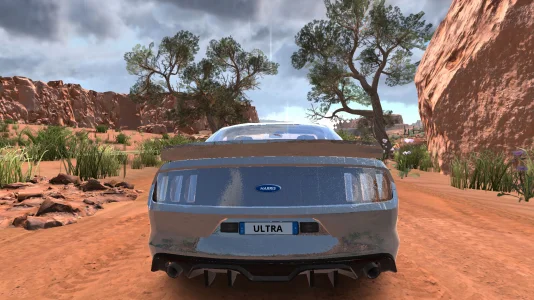
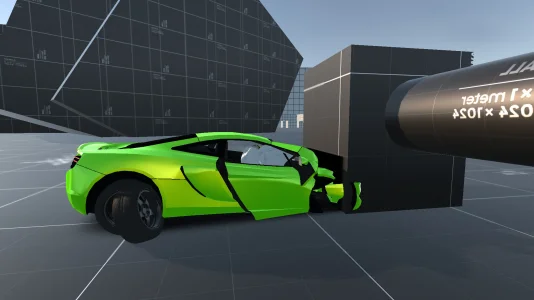
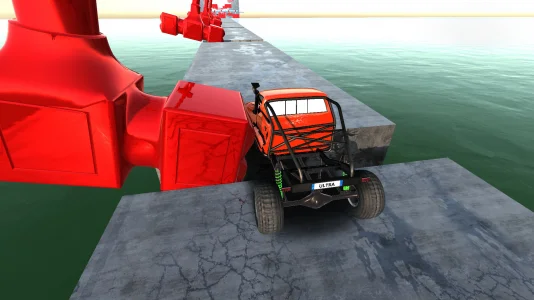
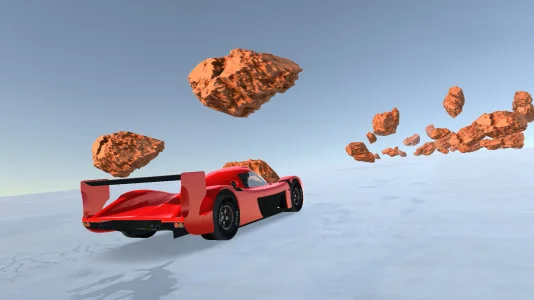
DriveCSX Car Crash Simulator stands as a specialized entry within the mobile vehicle simulation genre, distinct from traditional arcade racers due to its focus on realistic destruction mechanics. Developed and published through a complex network of entities including Studio WW Games, Honan Studio, and PSV Studio, the application offers a sandbox environment designed to test the limits of mobile hardware. The title, formerly known as DriveX Car Crash Simulator, leverages an advanced soft-body physics engine to replicate authentic vehicle deformation, component detachment, and environmental interaction. This article provides a technical breakdown of the game’s ecosystem, installation requirements for APK users, and gameplay mechanics.
Understanding the provenance of DriveCSX is essential for users managing installation files. While the Google Play Store lists the publisher as Studio WW Games, the underlying application architecture reveals Honan Studio as the original creator. This is evidenced by the immutable Android package ID: com.honanStudio.driveX. On iOS platforms, distribution is handled by PSV STUDIO LTD. This distinction is critical for users manually installing the game, as the OBB data file must match the package signature exactly to function correctly.
The application is classified under the Simulation and Vehicle Sim categories. Unlike competitive racing games that prioritize speed and lap times, DriveCSX operates as a physics sandbox. The core gameplay loop does not feature a traditional career mode or linear progression; rather, it provides a suite of tools for users to experiment with vehicular dynamics in an open environment.
The primary draw of DriveCSX Car Crash Simulator is its fidelity in simulating kinetic energy and material resistance. Vehicles are modeled not as rigid bodies, but as interconnected nodes that deform dynamically upon impact. This soft-body physics system allows for unique crash outcomes, ranging from minor cosmetic dents to catastrophic structural failure where parts detach completely.
The application divides its simulation experiences into three primary distinct modes:
Users intending to download the DriveCSX APK must be aware of significant hardware demands that exceed official minimum specifications. While the Google Play listing suggests compatibility with Android 7.1 (Nougat), the real-time physics calculation requires a modern processor with at least 4 physical cores to maintain a playable frame rate. The PC version (via Google Play Games) suggests a baseline of 8GB RAM, implying that high-end mobile devices are necessary for optimal performance.
A critical technical anomaly exists regarding the game's storage footprint. While the initial APK installation file is approximately 125.5 MB, this file serves merely as a launcher. The essential assets—textures, models, and physics data—are stored in a separate OBB file. User reports indicate that the post-installation size on Android can balloon significantly, with some users citing a total consumption of up to 15 gigabytes (GB). In contrast, the optimized iOS version requires a total installation of approximately 959.2 MB. Users must ensure substantial free space is available before initiating the download.
For users bypassing the Google Play Store, installing DriveCSX requires a precise manual procedure. Unlike standard single-file apps, this simulation utilizes a split-file structure. Failing to install the OBB file correctly will result in a "black screen" error or immediate crash upon launch.
DriveCSX_v0.88.1.apk (approx. 125 MB) and the corresponding OBB data file (often a .zip containing com.honanStudio.driveX). Ensure version numbers match exactly.com.honanStudio.driveX. Inside, there must be a file ending in .obb.com.honanStudio.driveX folder into the device's internal storage directory: Android/obb/.The economic model of DriveCSX relies on a "time-for-content" exchange rather than premium currency. The game is free-to-play, granting access to a roster of over 60 vehicles. However, these vehicles are gated behind an ad-supported unlock system. To utilize a specific car, the player must view a video advertisement. Furthermore, the "Reset Car" function—essential after a crash renders the vehicle undrivable—triggers interstitial ads every 3-4 uses.
For users seeking a premium experience, the developer offers a one-time in-app purchase labeled "NO ADS" (approx. $4.99). This transaction fundamentally alters the software's utility, removing all video interruptions and granting instant, permanent access to the full vehicle fleet and unrestricted gameplay resets. This purchase transforms the application from an ad-heavy demo into a fully owned sandbox title.
Beyond the surface-level destruction, the Honan Studio developers have integrated subtle simulation details that appeal to automotive enthusiasts. The braking system features thermal simulation, where brake discs visibly glow red during sustained heavy use. Additionally, high-impact frontal collisions trigger the deployment of driver and passenger airbags within the cockpit. Recent updates have further expanded customization options, allowing players to modify engines, apply decals, and adjust paint, although the user interface for these tools has been noted as complex.
The development cycle for DriveCSX is highly active, with version 0.88.1 appearing in late 2025. The developers actively solicit feedback via support channels and have confirmed that a multiplayer mode is currently in development—a feature highly requested by the community. While the current build remains a single-player, offline experience, the frequent addition of new maps, vehicles, and physics tweaks demonstrates a commitment to evolving the title into the definitive mobile alternative to PC-based crash simulators.
DriveCSX Car Crash Simulator establishes itself as a specialized entry within the vehicle simulation genre, prioritizing realistic destruction over competitive Racing. Developed legally by PSV CLEVER ADS SOLUTIONS LTD and technically identified by the package ID com.honanStudio.driveX, the application functions as a dedicated physics sandbox. The title distinguishes itself from standard arcade racers through its integration of an advanced soft-body physics engine. This technical framework models vehicles not as rigid objects, but as collections of interconnected nodes that react dynamically to impact forces.
The gameplay experience centers on experimentation within open environments rather than linear career progression. Players engage with a simulation where vehicle deformation, part detachment, and suspension geometry are calculated in real-time. While the game is available on Android, iOS, and PC via Google Play Games, the mobile iteration requires significant hardware resources due to the complexity of these physics calculations. The title is frequently cited by the community as a mobile alternative to PC-based simulators like BeamNG.drive due to its fidelity in modeling mechanical stress and material failure.
The primary mechanic driving DriveCSX Car Crash Simulator is the interaction between the vehicle chassis and the environment. Unlike games that use pre-rendered damage textures, this simulator deforms the vehicle model based on the exact angle and velocity of a collision. The physics engine extends beyond bodywork to include intricate mechanical details.
Players observing the simulation closely will notice authentic operational details. Brake discs are programmed to heat up and glow red during periods of heavy deceleration or high-speed maneuvering. Furthermore, severe frontal impacts trigger the visual deployment of airbags within the cabin, adding a layer of immersion to the crash sequences. The simulation also accounts for environmental physics, including water resistance and mud viscosity, which directly alter tire traction and suspension compression.
The application structures its gameplay across three distinct modes, each offering a different environment for testing the physics engine. Since the game lacks a traditional career mode or currency-based progression, these modes serve as independent sandboxes for player experimentation.
Free Roam represents the core experience of the game. Players spawn into expansive open-world maps, such as the desert-themed Utah environment, with no time limits or objectives. The primary goal in this mode is exploration and stress-testing vehicles against terrain features. This mode allows users to fully utilize the Reset Car function to repair damage instantly after catastrophic crashes, facilitating continuous play without loading screens.
For players seeking structured challenges, the Rally Stages mode shifts the focus from destruction to precision driving. This mode functions as a time trial system where players navigate complex courses. Audio cues from a virtual co-driver, known as pace notes (e.g., “caution square right”), guide the player through the track. Recent updates have expanded this mode with “Extreme Track” and “Explosive Downhill” scenarios, testing the player’s ability to manage suspension stability on uneven surfaces.
The Crash Test mode provides a controlled laboratory environment specifically designed for destruction. These maps are populated with artificial obstacles, ramps, crushing machines, and high-speed loops. This mode allows players to observe the limits of the damage model in a repeatable setting, making it ideal for testing how specific impacts affect different parts of the 60-car roster.
The game features a comprehensive library of approximately 60 to 61 vehicles, ranging from standard sedans to high-performance sports cars. A recent update introduced a vehicle customization system, allowing players to modify engines, apply paint, and affix decals. However, the interface for placing text and visual elements is noted for its complexity.
Access to this vehicle roster operates on a unique “time-for-content” economy rather than a currency system. The Free-to-Play model allows players to unlock any vehicle by viewing a video advertisement. This unlock is often temporary or per-session, requiring players to engage with the ad system to switch vehicles. A permanent “NO ADS” purchase option exists, which effectively unlocks the entire roster and removes interruptions associated with the Reset Car mechanic.
DriveCSX Car Crash Simulator supports multiple input schemes to accommodate different levels of precision. While standard touch controls (on-screen buttons) and tilt steering are available, they may lack the nuance required for managing soft-body physics at high speeds.
The developers explicitly support and recommend the use of wireless controllers. Connecting a Bluetooth gamepad (such as a PS5 or Xbox controller) allows for analog throttle and steering inputs, which are critical for maintaining control during the rally stages or correcting a slide on loose terrain. The game creates a bridge between mobile accessibility and the demanding inputs of a simulation title.
Mastering the physics of DriveCSX requires understanding the limitations of the hardware and the vehicle models. The following strategies optimize the gameplay experience:
Potential players must acknowledge the substantial technical footprint of the application. While the initial APK installation package is approximately 125.5 MB, the game relies on a massive OBB data file to store high-resolution assets. A full installation on Android can consume up to 15 gigabytes of storage. Furthermore, the real-time deformation requires a processor with at least 4 physical cores and substantial RAM (recommended 4GB+) to avoid crashing or severe frame drops.
Studio WW Games and Honan Studio maintain an active development cycle, frequently releasing updates that optimize physics and add content. While a multiplayer mode is heavily requested and confirmed to be in development, the current iteration remains a single-player, offline-capable experience. An internet connection is only strictly required for the initial asset verification and the ad-based vehicle unlocking process.